




Replatforming a marketing site looks straightforward from the outside. The pages already exist, the copy is written, the design is signed off. All that’s left is to rebuild it somewhere else.
In practice, the rebuild is the easy part. The hard part is proving the new site is as good as the old one — and knowing what “as good” even means before you start.
This is an account of moving an 87-page marketing site off a hosted visual builder onto a static framework. The specifics are Webflow and Astro, but almost none of what follows depends on those choices.
Decide what parity means before you write any code
The first question on any replatform is how closely the new site must match the old one. It sounds like a question about quality. It’s really a question about budget.
“Pixel-perfect” is the expensive answer. Matching a hosted builder exactly means reproducing its quirks: the margin collapse its reset happens to produce, the way its grid rounds fractional columns, the extra ten pixels its list styling adds to every bulleted list. You can do it, but you end up reimplementing another system’s accidents inside your own.
The cheaper and usually better answer is visually equivalent at the breakpoints that matter. A reader cannot tell that a section is eleven pixels shorter than it used to be. They can tell when the navigation is unreadable or an image is cropped through somebody’s face.
Make that call explicitly, write it down, and hold to it. Teams that leave it unstated drift into pixel-perfect by default, because every individual difference looks worth fixing when you’re staring at it.
Measure the original, don’t eyeball it
The single biggest time saver is refusing to guess at values.
A hosted builder’s rendered output is a measurable artefact. You can open any page, select any element, and read its real computed values: font size, line height, padding, gap, grid columns, the exact colour after every overlay. That’s your specification. It’s more reliable than a design file, because it’s what visitors actually see today.
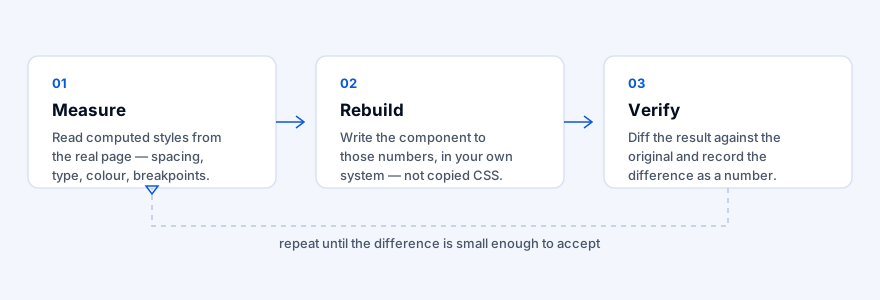
Guessing produces a component that looks about right and is wrong in ways that surface later. Measuring produces one you can defend with a number.
Two things this turned up that no amount of looking would have:
- A hero section’s dark overlay was two layers, not one — a navy tint beneath a black wash. Reproducing only the black one left the navigation unreadable against the photograph, and the cause was invisible to the eye.
- Section headings sat on a grid whose column gap was 16px, not the 32px that looked correct. The 16px difference changed where text wrapped, which changed section height on every page that used the pattern.
Build the measuring step into your workflow rather than treating it as debugging. It’s the specification, not the fallback.
Verify with a number, not a screenshot
Screenshot comparison catches gross errors and little else. Two renderings that differ by a few pixels of leading look identical side by side, and the difference compounds down a long page.
Pick a metric you can automate. Total page height against the original is crude but surprisingly effective: it catches accumulated spacing drift, missing sections and wrong font metrics in one number, and you can run it across every route in a couple of minutes.
It won’t catch everything, and you should know what it misses. On this project the height check passed on pages where:
- navigation links were rendering in near-black on a dark photograph, invisible but exactly the right size
- a hero image was off-centre and overflowing to the right
- a card’s icons rendered at 50px instead of 30px, inside a container that didn’t change height
None of those changed page height, so none of them failed. A metric only tells you about what it measures. Keep a human looking at the result, and treat the automated check as a floor rather than a ceiling.
Content is where the real decisions are
Rebuilding templates is mechanical. Moving content is not.
A hosted CMS gives you rich text as a blob of HTML, carrying the builder’s own class names. You have two options, and both cost something:
Keep the HTML. Fast, faithful, and you inherit the original rendering exactly. The price is that your content now depends on CSS class names from a system you’re leaving. Delete the wrong rule later and a page silently loses its formatting.
Convert to Markdown. Clean, portable, editable by non-developers, and it drops the dependency. The price is fidelity: structures that Markdown can’t express — embedded widgets, complex tables, figure captions — need rebuilding by hand, and every converted page needs rechecking.
Neither is wrong. What is wrong is picking one by accident and not writing down why. If you keep the HTML, record it as a deliberate trade with a plan to convert later. An undocumented decision reads as carelessness in review; a documented one reads as engineering.
Images are usually the biggest and most ignored win
The asset folder on this project started at 398 MB across 1,442 files. It finished at 30 MB across 384, with no visible quality loss.
Almost none of that was clever compression. It was three unglamorous passes:
Delete what nothing references. 997 files — 233 MB — were referenced by no page at all: leftovers from the original export, responsive variants the new build didn’t use, media downloaded for pages that were later rebuilt. Checking is simple: collect every asset path referenced in your source and your built output, compare against the folder, and look at what’s left over.
Collapse duplicates. The same image often arrives twice under different names, once from an export and once from a CDN sync. Fifty-two files were byte-identical copies of another file.
Resize to the size actually displayed. This is the large one and it isn’t really compression. A 5913px-wide photograph displayed in a 400px card is being downscaled by the browser on every page load, after the visitor has downloaded all 3.4 MB of it. Serving it at the size it’s rendered costs nothing visually.
Measure the rendered width of every image across your pages rather than guessing a target. And set the quality per image rather than globally — photographs tolerate aggressive compression, screenshots containing text do not. A blanket setting either wastes bytes on photos or turns small text to mush.
One caution learned the hard way: anything small enough that resizing saves little — logos, icons, badges — should be left at its original dimensions. The saving is negligible and downscaling is exactly what makes a logo look soft.
Redirects are not optional, and they are not about your own links
This is the step most often skipped, usually because of a reasonable-sounding misunderstanding: our navigation already points at the right pages, so why do we need redirects?
Because most visitors never touch your navigation. They arrive from a search result, another site’s link, a bookmark, or an email campaign sent last year — straight onto a URL you didn’t choose.
If your URL structure changes at all, those links land on nothing. The visitor sees an error page and leaves, and the search ranking that URL accumulated is thrown away.
Before launch, get the old site’s sitemap and check every URL in it against the new site. On this project that exercise found an entire duplicate URL family — an unfinished set of pages the builder had published and listed for indexing alongside the real ones. Nine URLs that search engines had been told to index, which the new site had no equivalent for.
Each one needs a permanent redirect to its closest match. It’s a small text file, and it protects traffic you have already paid for.
What this buys you
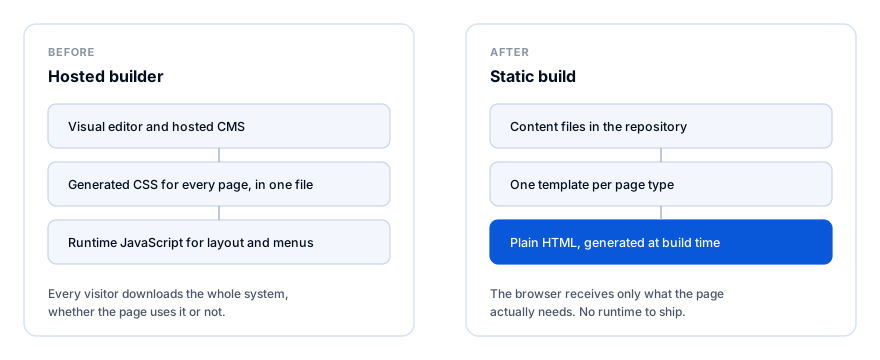
The output is a folder of plain HTML. There’s no runtime to ship, no builder-specific JavaScript, and nothing between the visitor and the page.
The less obvious gains matter more over time:
- Content lives in version control. Every change has an author, a date and a diff.
- Mistakes fail loudly. A content file missing a required field stops the build instead of publishing a page with a blank heading.
- Templates are shared. 87 pages from 14 template files. Changing a card design means editing one file, not hunting for every page that used it.
- The hosting bill approaches zero, because static files are the cheapest thing on the internet to serve.
If you take one thing from this
Measure the original, rebuild in your own system, and verify the difference as a number you can state out loud.
Everything else — which framework, which host, which CSS approach — is a preference. That loop is what turns a replatform from an argument about whether it looks right into a question with an answer.